
Download ADJ Security Easy – video surveillance app, Android security app, remote camera monitoring, home security app, free surveillance app, ADJ Easy cameras, real-time camera view, secure camera app, mobile camera control
Overview
ADJ Security Easy is a dedicated video surveillance application designed for Android devices, enabling users to remotely monitor their ADJ Easy cameras from virtually any location. The app serves as a bridge between the user and their security hardware, allowing instant access to live camera feeds through a secure connection. Its primary purpose is to provide real-time visibility into homes, offices, or other monitored areas, helping users maintain awareness and respond promptly to any activity.
The software is particularly suited for individuals and small business owners seeking a straightforward way to manage their physical security without relying on complex systems. It supports multiple camera views, which enhances situational awareness when overseeing multiple locations or zones. The app is designed to connect automatically after initial setup, reducing user friction and streamlining the monitoring experience.
While the developer, ADJ Security, did not provide additional background details, the app’s focus on simplicity and security suggests a targeted approach to user accessibility. Real-world use cases include monitoring children at home, checking on pets, or ensuring the safety of remote business premises. The app is available at no cost, increasing its accessibility to a broad audience.
Key Features & Capabilities
- Remote Camera Monitoring: Enables live viewing of ADJ Easy cameras from any location with an internet connection, supporting real-time video streaming for immediate situational awareness.
- Automatic Connection: After initial configuration, the app establishes a secure connection to the user’s cameras without requiring manual re-entry of credentials or settings.
- Multi-Camera Support: Allows users to view and manage multiple camera feeds simultaneously, improving efficiency when overseeing larger or multi-zone environments.
- Secure Connection Protocol: Implements encryption and secure authentication to protect video streams and user data from unauthorized access.
- Simple Setup Process: Designed with minimal configuration steps, making it accessible to users with limited technical experience.
- Product Line-Specific App: Ensures compatibility by directing users to the correct application based on their purchased ADJ Easy camera model.
These features collectively address common pain points in home and small business security, such as setup complexity, connection instability, and data privacy. For example, a homeowner can check on their front door while traveling, or a small shop owner can monitor inventory after hours. The app’s focus on seamless integration with ADJ Easy hardware ensures reliable performance within its intended ecosystem. The developer did not specify advanced features like motion detection alerts or cloud storage, so functionality is limited to core remote viewing and management.
User Interface, Workflow & Performance
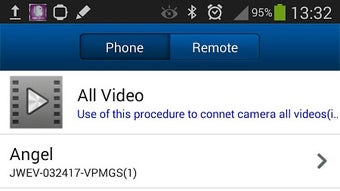
The user interface of ADJ Security Easy is structured to prioritize clarity and ease of access. Navigation is straightforward, with camera feeds displayed prominently on the main screen, allowing users to quickly switch between devices. The layout is minimalistic, reducing visual clutter and supporting intuitive operation.
Workflow efficiency is enhanced by the automatic connection feature, which eliminates the need for repeated login attempts or manual reconfiguration. Users can initiate a live view with minimal taps, streamlining the monitoring process. The app’s performance is expected to be stable under normal conditions, though exact resource usage details were not specified.
General software behavior patterns suggest efficient handling of video streams with minimal lag when network conditions are favorable. Stability during extended use was not documented, but the app’s lightweight design—10.2 MB in size—indicates low system overhead. The developer did not provide information on CPU or RAM consumption, nor did they share performance benchmarks.
However, the app’s focus on core functionality suggests it is optimized for consistent operation without excessive resource demands.
Compatibility & System Requirements
ADJ Security Easy is designed for Android devices, with the current version being 1.0.2. The app has a file size of 10.2 MB, indicating a lightweight footprint that should not strain storage on most modern smartphones or tablets. The developer did not specify exact system requirements, including minimum Android version or hardware specifications.
Compatibility information is limited to the operating system, with no details on supported screen resolutions, processor types, or memory configurations. It is recommended that users ensure their device runs a current version of Android to support secure connectivity and video playback. The app is available exclusively through the Google Play Store, which ensures standard installation procedures and automatic update delivery.
Users should verify that their device is compatible with the latest Android security patches and that the Google Play Services framework is up to date for optimal functionality.
Pros and Cons
Pros
- Free to download and use, lowering the barrier to entry for home and small business users.
- Simple, intuitive interface designed for users with minimal technical experience.
- Automatic connection to ADJ Easy cameras after setup, reducing user effort.
- Supports multiple camera views for broader monitoring coverage.
- Secure connection protocol helps protect user privacy and data integrity.
Cons
- Compatibility details, including minimum Android version and hardware requirements, were not provided.
- Limited functionality beyond live video viewing; no mention of motion alerts, recording, or cloud storage.
- App is only available for Android, restricting access for users on other platforms.
- Exact performance and resource usage metrics were not disclosed.
- Reliance on Google Play Store for updates may limit availability in certain regions.
FAQ Section
Is ADJ Security Easy compatible with all Android devices?
The app is designed for Android, but specific compatibility details such as minimum OS version or hardware requirements were not provided. Users are advised to ensure their device runs a current version of Android and has access to the Google Play Store.
Is the app safe to use?
ADJ Security Easy implements a secure connection to protect video streams and user data. While the exact encryption standards were not disclosed, the app is distributed through the Google Play Store, which enforces security policies for published applications.
Does the app require an internet connection?
Yes, a stable internet connection is required to access live camera feeds remotely. The app connects to the user’s ADJ Easy cameras over the internet, so offline viewing is not supported.
Can I use the app with non-ADJ cameras?
The app is specifically designed to work with ADJ Easy cameras. The developer did not indicate support for third-party or non-ADJ camera models.
How often are updates released?
Updates are delivered through the Google Play Store. The release date of the current version is May 15, 2023, but the update frequency has not been disclosed.
Final Thoughts + CTA
ADJ Security Easy delivers a focused and accessible solution for remote camera monitoring, particularly for users invested in the ADJ Easy product line. Its clean interface, automatic connection, and secure streaming make it a practical tool for maintaining peace of mind while away from home or business premises. While the app lacks advanced features like motion detection alerts or cloud recording, its simplicity and free availability make it a strong choice for basic surveillance needs.
The absence of detailed system requirements and performance data limits deeper evaluation, but the app’s lightweight design suggests broad compatibility with modern Android devices. For users seeking a straightforward, secure way to view their ADJ Easy cameras remotely, this app provides a reliable and user-friendly experience. Download ADJ Security Easy now to keep your property under watch, anytime, anywhere.





.png)

